
Mark Raymond Mason Fine Art Abstract Photography
~

If your monitor is set up differently than mine, my photographs may look strange on your computer.  If you think this could be the case, try adjusting your monitor by following these four steps:


Step 1: Resolution

To view the photographs without scrolling, set your screen resolution to the highest possible.  This is usually done by adjusting the monitor display settings in your operating system.  If possible, set your browser to view this website using full screen mode.

Step 2: Viewing Angle

Adjust your monitor until you're looking at it squarely.  Looking up at your monitor can darken a photo, and looking down at your monitor can brighten it.  Looking at your monitor from the side can give the photo a yellow or blue colour cast.

Step 3: Colour

To view the photographs without colour casts, set your monitor's colour setting to the "normal" preset.  This is usually done using buttons on the front of the monitor.  Some monitors don't have colour settings – if yours doesn't, it's probably set this way by default.

Step 4: Brightness

To view the full tonal depth of the photographs, adjust your monitor's brightness and contrast settings until you see 24 distinct rectangles in the image below.  The first and last rectangles should merge with the bar on the top and the bar on the bottom.  Some monitors won't allow you to see all 24 rectangles, and some monitors don't let you change these settings.  If in doubt, choose the brighter, higher contrast setting.
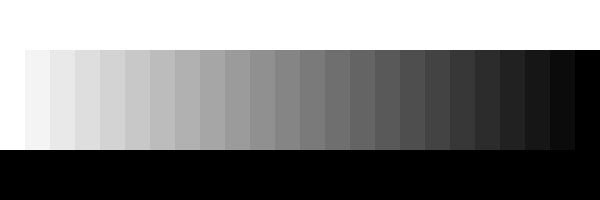
Photographic monitor calibration bar

You should now be able to accurately view the photographs on MarkRaymondMason.com.  Keep in mind that no web photo can match the detail, colour depth, or tonal range of a fine art photographic print.  Many mobile devices do not allow monitor adjustments.

Enjoy my photography galleries!

Random Photo
Burnt Plaster

Burnt Plaster: Most of the houses in this tiny Spanish village were submerged when a hydroelectric dam flooded the valley floor.  The few buildings left ... More »

News & Info | Subscribe

28.Mar.13
Leaf Skin, Water Beads:
This new photo is one of many I've made recently exploring the tiny dew drops and water bubbles I see ... More »

01.Nov.12
Website Now in HD:
My website is now HD compatible, for devices with capable technology. Browsing with a regular computer will be the same ... More »

29.Oct.12
Fierro Canyon Gallery Sucessful Opening:
The Fierro Canyon Gallery show alongside owner Christopher Saxman opened with great success on Friday evening, with over 100 in ... More »

Guestbook | Sign Book

Apr.13
 Cindy: Allen, TX, USA
"I love that your photos incorporate the beauty of natural, rural, urban, black and ..." More »

Apr.13
 Caroline: Birmingham, UK
"I'M A COMPLETE AMATEUR AND YR SITE HAS INSPIRED ME TO BUY A CAMERA ..." More »

Apr.13
 Angelito: Calgary, AB, Canada
"Hi Mark, I stumbled upon your site while browsing online for abstract photography, your ..." More »

Daily Photo Tip

18.May.13
'Coma' is a lens aberration produced at a small aperture with an off-center object. In a lens affected by coma, a point object will instead appear as a blurred, comet-shaped image. The degree of coma varies with the lens. (First published Jan 20, 2010)